
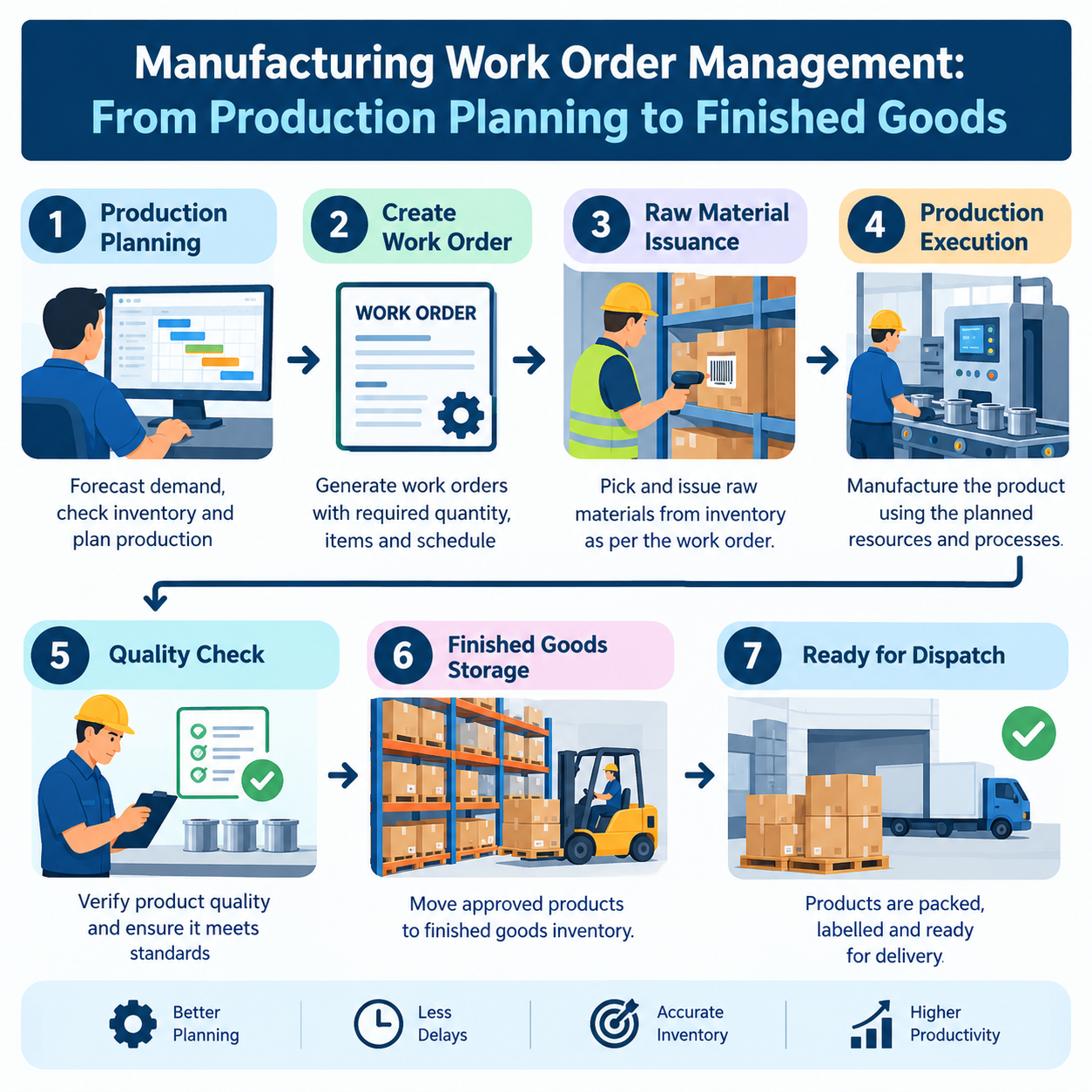
Ask any production manager what keeps them up at night, and the answer is rarely "not enough orders." It's usually the opposite problem: too many orders, too many moving parts, and no single, reliable way to know exactly where each one stands right now. A work order that looked fine on the planning sheet yesterday might be stuck waiting for material today, or sitting in a queue behind a machine breakdown nobody's reported yet.
This is the core challenge of manufacturing work order management — turning a plan into a finished, quality-checked product without losing visibility at any step along the way. Whether that journey is tracked on paper or inside an ERP system makes an enormous difference to how reliably it actually happens.
What Is a Manufacturing Work Order?
A manufacturing work order is the formal instruction to produce a specific quantity of an item, by a specific date, following a defined process. It typically specifies:
The item to be manufactured and the quantity required
The Bill of Materials (BOM) — the exact raw materials, components, and sub-assemblies needed
The routing — the sequence of operations (cutting, machining, assembly, finishing, etc.)
The target start and completion dates
The machines, work centers, or departments involved
In practice, a work order is the bridge between "what the business wants to make" (driven by sales orders or forecasts) and "what actually happens on the shop floor." Everything from material planning to shop floor scheduling to costing eventually ties back to this document.
The Journey of a Work Order: Planning to Finished Goods
A work order doesn't move in one step — it passes through several distinct stages, and each stage is a point where things can go smoothly or go wrong.
1. Production Planning
The work order is created based on demand — a confirmed sales order, a forecast, or a replenishment trigger for stock items. At this stage, planners decide quantities, priorities, and target dates, often balancing multiple work orders against limited machine and labour capacity.
2. Material Availability Check
Before a work order can be released to the floor, someone needs to confirm that the required raw materials and components are actually in stock — or on order and arriving in time. This is one of the most common failure points in manual systems: a work order gets released assuming material availability that turns out to be wrong, halting production mid-way.
3. BOM Verification
The Bill of Materials attached to the work order needs to match the current, approved version of the product structure — not an outdated revision. Engineering changes, substitute components, or updated specifications all need to be reflected before production starts, or the wrong materials get consumed against the wrong product configuration.
4. Production Execution and Operation-Wise Updates
Once released, the work order moves through its routing — one operation at a time. Each operation completion (or partial completion) needs to be recorded: what was done, by whom, on which machine, and how much time it took. This is where the work order stops being a static document and becomes a live record of shop floor activity.
5. Quality Inspection
At defined points — often after critical operations or before finished-goods receipt — the work order output goes through quality inspection. Inspectors check the output against specifications and record pass/fail results.
6. Rejection and Rework
Not everything passes inspection the first time. Rejected quantities need to be recorded against the specific operation and reason, and a decision made: scrap, rework, or return to a previous operation. Without accurate rejection tracking, quality trends and root causes stay invisible.
7. Finished Goods Receipt
Once the work order's output clears final inspection, it's received into finished goods inventory, closing the loop between production and stock. At this point, the work order is complete — assuming every stage along the way was accurately tracked.
Manual Work Order Tracking vs. ERP-Based Work Order Management
Here's where the difference between manual and system-based tracking becomes very concrete.
Manual tracking typically looks like this: a printed job card travels physically with the batch, operators scribble notes or timestamps on it, a supervisor periodically walks the floor to check progress, and someone updates a spreadsheet (often at the end of the shift or the next morning) to reflect what happened. Material issues are recorded separately in a stores register. Quality results live in a different inspection report. None of these are connected in real time, which means:
Nobody can answer "what's currently in production and at which operation" without walking the floor or making phone calls.
Material shortages are discovered when production physically stops, not before.
Delays are noticed only once a delivery date is already at risk.
Rejection and rework data is hard to trace back to a specific machine, operator, or shift.
Finished goods receipt and inventory updates lag behind the actual physical movement of goods.
ERP-based work order management replaces this fragmented picture with a single connected record. When a work order is created in a manufacturing ERP software, material availability is checked against real-time stock, the BOM is pulled from the current approved version automatically, and every operation update, quality result, and material transaction is logged directly against that work order. The result:
Planners and managers can see, at any moment, exactly what's planned, what's in production, what's delayed, and what's completed — without needing to ask anyone.
Material shortages are flagged before a work order is released, not after production has already started.
Delay alerts trigger automatically when actual progress falls behind the planned schedule.
Rejection and rework data is tied to specific operations, machines, and operators, enabling real quality analysis.
Finished goods receipt updates inventory the moment production is confirmed complete — no separate reconciliation needed.
This isn't a minor efficiency gain. It's the difference between managing production reactively (finding out about problems after they've already cost time) and managing it proactively (seeing problems as they emerge and acting before the delivery date is affected).
A Practical Example: A Small Precision Components Manufacturer
Consider a small manufacturer producing precision-machined components for industrial equipment, running a mix of turning, milling, and surface-finishing operations across a handful of machines, with a small team of operators.
Before ERP: Work orders were printed job cards. The planner scheduled orders based on rough capacity estimates. Material availability was checked by physically walking to the stores. When an operation took longer than expected — say, a milling step delayed by a tooling issue — nobody in the planning office knew until the supervisor mentioned it at the end of the day, by which time a customer delivery was already at risk. Rejected pieces were noted in a register but rarely analyzed for patterns, so a recurring machine-related rejection issue went unaddressed for months.
After ERP: Work orders are created directly from confirmed sales orders. The system checks material availability instantly and flags shortages before release. Operators log completion at each operation using simple shop floor terminals, so the planner sees live status — including the fact that the milling operation on a specific work order is running behind schedule, the same day it happens, not the next. Rejections are logged against the specific machine and operation, and over a few weeks, a pattern emerges showing one particular machine causing a disproportionate share of rejections — something that would have taken months to notice manually. Finished goods are received into inventory automatically the moment the last operation and inspection are confirmed complete.
The company didn't change what it manufactures or how — it changed how visible that process was, and that visibility is what let them catch problems early instead of after the fact.
How This Fits Into the Bigger Manufacturing ERP Picture
Work order management doesn't operate in isolation. It depends on and feeds into several other parts of a connected production order management system:
Engineering Day Book entries often explain why a work order got delayed or reworked — a noted tooling issue or process deviation logged against the same job.
Bill of Materials (BOM) accuracy is what makes material availability checks and consumption tracking meaningful in the first place.
QA Inspection results determine whether a work order's output moves to finished goods or back for rework — the two processes are tightly linked.
Broader manufacturing ERP features — inventory, planning, and reporting — all draw on work order data to give management a complete, real-time view of the business.
Getting work order management right is what makes all of these other pieces actually useful, because they all depend on accurate, timely data about what's happening to each order as it moves through the plant.
A manufacturing work order carries a lot of responsibility — it's the single document that ties together planning, materials, production, quality, and inventory. When it's tracked manually, that responsibility gets diluted across paper job cards, disconnected registers, and end-of-day updates, leaving management to react to problems after they've already affected delivery. Work order software built into a manufacturing ERP changes that by keeping every stage — planning, material availability, BOM verification, operation-wise progress, quality inspection, rejection/rework, and finished goods receipt — connected and visible in real time. For manufacturers evaluating production planning software in India, this connected visibility, more than any single feature, is usually what delivers the most immediate and measurable impact.
Frequently Asked Questions
1. What is a manufacturing work order? A manufacturing work order is a formal instruction to produce a specific quantity of an item by a target date, specifying the Bill of Materials, the routing of operations, and the resources involved. It's the central document connecting planning, production, and inventory.
2. How does ERP improve work order management compared to manual tracking? ERP-based work order management checks material availability automatically, pulls the current approved BOM, captures operation-wise progress in real time, and flags delays as they emerge — replacing the fragmented, delayed visibility of paper job cards and disconnected spreadsheets.
3. What happens when a work order fails quality inspection? Rejected quantities are recorded against the specific operation, machine, and reason. Depending on the issue, the item may be scrapped or sent back for rework at a previous operation, with the ERP tracking this movement against the same work order.
4. Can ERP work order management help with delayed production? Yes. Because the ERP compares planned versus actual progress continuously at the operation level, it can flag a work order that's falling behind schedule as soon as the delay starts — well before the final delivery date is at risk.
5. Is work order management software useful for small manufacturers in India? Yes. Production planning software in India built for small and mid-sized manufacturers is designed to digitize the same work order and job card process already in use, making the transition practical without a full process overhaul.
6. How are work orders connected to the Engineering Day Book and QA Inspection? The Engineering Day Book often records the context behind a delay or deviation on a specific work order — a tooling issue or process change — while QA Inspection results determine whether that work order's output is accepted, reworked, or rejected. Together, they provide the detail behind the work order's real-time status.
Related reading: Engineering Day Book · Manufacturing ERP Features · Bill of Material · QA Inspection
