
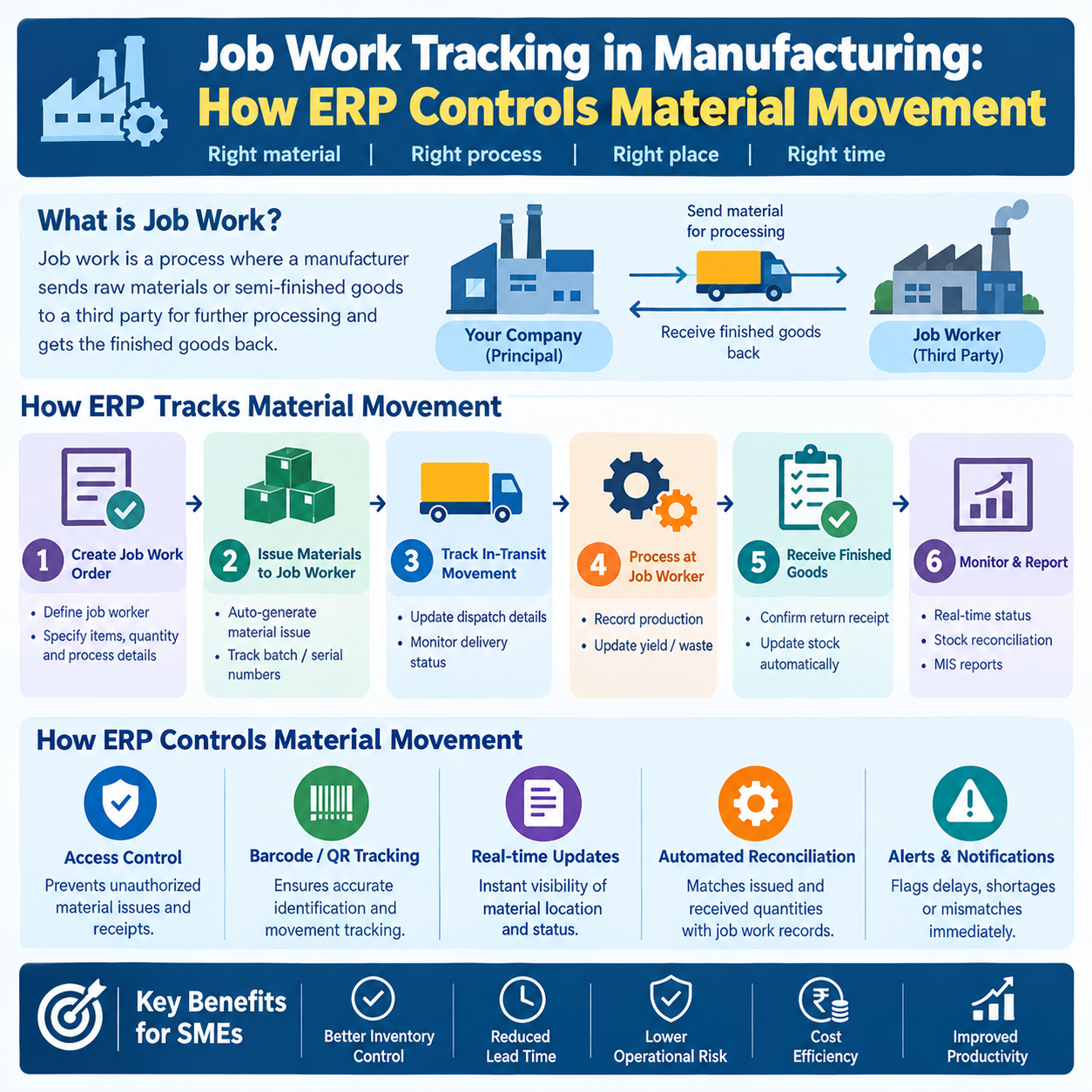
Job work is one of the most operationally risky parts of manufacturing — not because the work itself is complicated, but because it involves material that doesn't belong to you, moving through processes that often happen outside your own four walls. Whether you're receiving a customer's raw material for processing, or sending your own semi-finished goods out to a subcontractor for plating, heat treatment, or machining, the moment material leaves direct visibility, the risk of loss, delay, or billing disputes goes up sharply.
Most SMEs still manage this with delivery challans, WhatsApp updates, and an Excel sheet someone updates "when they get time." It works — until a customer asks for a reconciliation report, or a subcontractor's return quantity doesn't match what was sent, and nobody can reconstruct the trail. This is exactly the gap that a proper job work ERP software setup is built to close.
What Is Job Work in Manufacturing?
Job work refers to any manufacturing process performed on material that is owned by another party — either:
Inward job work — a customer sends you their raw material or semi-finished goods, and you perform a specific process (machining, assembly, coating, etc.) and return the processed goods, billing only for the processing/labor.
Outward job work (subcontracting) — you send your own material to an outside vendor to perform a process you don't do in-house (heat treatment, electroplating, specialized machining), and the vendor returns the processed material to you.
Both directions involve the same core challenge: tracking material that changes custody and physical form, without losing visibility on quantity, ownership, or process status.
The Complete Job Work Lifecycle
1. Customer Material Inward
The process begins when a customer's material arrives at your facility for processing. This needs to be recorded distinctly from your own purchased inventory — it's not your stock, it doesn't belong on your balance sheet as owned material, but it absolutely needs to be tracked with the same rigor as anything else moving through your shop floor.
2. Delivery Challan
Material movement for job work is governed by delivery challans rather than tax invoices (since ownership isn't transferring in a sale). Every inward receipt and every outward dispatch — whether to a customer, or onward to your own subcontractor — needs an accurate, sequential challan capturing item, quantity, and purpose of movement.
3. Material Identification
Once received, material needs to be tagged and identified against the specific customer, job order, and often against a particular batch or lot — especially when multiple customers' material of similar type is being processed concurrently. Without correct identification at this stage, everything downstream (production allocation, return, billing) becomes guesswork.
4. Production / Process Stage
The material moves into your production process — whether that's a single operation or a multi-stage routing. This is where the connection to your BOM structure matters even for job work: the process consumption, expected yield, and any additional materials you add (fasteners, consumables, paint) need to be tracked against the job, not lumped into general production.
5. Material Sent to Subcontractors
If part of the process needs to go outside your facility — for example, a component needs electroplating that you don't do in-house — it gets dispatched to a subcontractor under its own delivery challan. At this point, you're simultaneously managing your customer's material (inward job work) and your own material at a subcontractor's site (outward job work) — often for the same job order.
6. Processed Quantity Tracking
When material returns from a subcontractor, or when an internal process stage completes, the processed quantity needs to be recorded against what was originally sent. This is where quantity mismatches typically surface — and where good tracking either catches the issue immediately or lets it slide until it becomes a bigger dispute later.
7. Rejection Handling
Not all processed material passes inspection. Rejections need to be recorded with reason codes, linked back to the specific batch and subcontractor (for outward job work) or process stage (for inward job work), and factored into reconciliation. This data is also what tells you, over time, which subcontractors have quality issues worth addressing.
8. Material Return
Processed goods — whether returned to your customer (inward job work) or received back from your subcontractor (outward job work) — need to be tracked against the original challan quantity, with variances (rejection, scrap, yield loss) clearly accounted for.
9. Reconciliation
Reconciliation ties the entire loop together: quantity sent vs. quantity received back vs. quantity rejected vs. quantity still pending at any stage. For inward job work, this reconciliation is often required by tax authorities as proof that customer material was processed and returned within stipulated timeframes. For outward job work, it's your only real defense against a subcontractor discrepancy.
10. Billing
Job work billing is based on processing charges — labor, machine time, or per-unit processing rates — not on material value (since you don't own the material). Accurate billing depends entirely on the accuracy of every step before it: if processed quantity or rejection data is wrong, the invoice will be too.
Why Excel and Paper Challans Create Visibility Problems
On paper, job work tracking looks simple — a few challans, a register, done. In practice, it breaks down fast:
No live view of material location. With paper challans, knowing exactly how much of a customer's material is currently in-process, in-transit to a subcontractor, or awaiting return requires manually flipping through registers or calling around.
Disconnected quantity trails. Excel sheets tracking "sent" and "received" quantities are usually maintained separately, and reconciling them means manually cross-referencing rows — a process that doesn't scale once you have multiple customers, multiple subcontractors, and overlapping job orders.
Rejection data gets lost. Rejected quantities noted on a subcontractor's return slip often never make it into a central record, so nobody has a clean picture of which vendors have the highest rejection rates.
Compliance risk. Job work involving customer-owned material has specific documentation and timeline requirements. Paper-based systems make it hard to produce an audit-ready reconciliation report on demand.
Billing errors. When processed and rejected quantities aren't tracked accurately in real time, job work invoices are prepared from memory or estimates — leading to disputes with customers over billed quantities.
No quality linkage. Paper challans record movement, not quality outcomes. There's no structured way to connect a subcontractor's process history to inspection results over time.
These aren't edge cases — they're the default failure mode for any SME running job work volume beyond a handful of transactions a month.
How ERP Connects Job Work with Inventory, Production, Quality, and Documentation
A proper job work management software module inside your ERP doesn't just digitize the challan — it links job work into the same operational backbone as the rest of your manufacturing:
Inventory — customer-owned and subcontractor-held material is tracked in a separate, clearly identified stock category, so it never gets confused with your own owned inventory, while still giving you a real-time view of exactly where every unit is.
Production — job work orders link directly to the relevant BOM and routing, so material consumption, additional components used, and process yield are tracked with the same discipline as your own production, not treated as an off-system side process.
Quality — processed material returning from a subcontractor or completing an internal stage is routed through the same inspection process as regular production, connecting job work directly to your QA Inspection records. This is what lets you build a real, data-backed view of subcontractor quality over time instead of relying on memory.
Documentation — every delivery challan, inward receipt, and return is generated and stored centrally, giving you an audit-ready trail without anyone maintaining a separate register.
This connected approach is a core part of what a well-built Manufacturing ERP delivers for job work-heavy operations — and it's specifically why SimpliRP's Job Work Manufacturing module is built to handle both directions of job work — material you receive from customers, and material you send to your own subcontractors — within a single, reconciled system.
Practical Example: A Component Manufacturer Using Subcontracted Plating
Consider a mid-sized manufacturer producing metal brackets. The bracket requires machining (done in-house) followed by zinc plating (outsourced, since the company doesn't run its own plating line).
Without ERP:
Machined brackets are sent to the plating vendor with a handwritten challan for 1,000 pieces.
The vendor returns 970 pieces two weeks later, citing "some rejections," with no reason code or breakdown.
Nobody flags that 30 pieces are unaccounted for until the finished goods count comes up short during final assembly.
The plating vendor is billed and paid based on the invoice they submit — with no independent quantity check against what was actually sent.
With ERP-based job work tracking:
A delivery challan for 1,000 pieces is generated and logged against the specific production batch and customer order.
The system tracks the material as "out for job work — plating," with an expected return date.
On return, 970 pieces are received and matched against the original challan; the shortfall of 30 pieces is recorded with a rejection reason (plating defects) captured against the vendor.
The reconciliation report shows 970 received, 30 rejected — no unexplained gap.
The QA inspection module logs the rejection, building a quality history for this subcontractor that flags them for review if defect rates continue rising.
Billing to the plating vendor's invoice is checked against the 970 confirmed good pieces, not the original 1,000 — preventing overpayment.
The process took the same physical steps either way. The difference is that one version leaves you with full visibility and a defensible number, and the other leaves you finding out about the shortfall by accident.
Benefits of ERP-Based Job Work Tracking
Real-time visibility into exactly how much material is with which customer or subcontractor, at what stage, at any moment.
Accurate reconciliation of sent, received, processed, and rejected quantities without manual cross-checking.
Faster, disputes-free billing based on confirmed processed quantities rather than estimates.
Subcontractor quality accountability, with rejection history feeding into vendor evaluation.
Audit-ready documentation for customer-owned material handling and compliance reporting.
Reduced material loss and shrinkage, since every movement is logged and reconciled against expectation.
Better production planning, since job work status feeds into the same planning view as your regular production orders.
Choosing Job Work ERP Software
If you're evaluating job work manufacturing software or subcontracting software, prioritize these capabilities:
Separate, clearly tagged inventory for customer-owned and subcontractor-held material.
Challan generation and tracking for both inward and outward job work.
Automatic reconciliation of sent vs. received vs. rejected quantities.
Integration with BOM and routing so job work consumption is tracked accurately.
Linkage to quality inspection so rejection data builds subcontractor performance history.
Reporting suitable for compliance and audit requirements around customer material handling.
For manufacturers evaluating a manufacturing ERP in India with strong job work capability, these aren't optional extras — they're the difference between job work being a controlled process and being a recurring source of disputes and unexplained losses.
FAQs
1. What's the difference between inward and outward job work? Inward job work is when you receive a customer's material to process and return. Outward job work (subcontracting) is when you send your own material to an external vendor to perform a process on your behalf. Most manufacturers with in-house limitations on certain processes handle both simultaneously.
2. Why can't job work material be tracked the same way as regular purchased inventory? Because ownership doesn't transfer — the material isn't yours (inward) or it's yours but temporarily outside your custody (outward). It needs separate tracking to avoid misrepresenting your owned stock and to satisfy documentation requirements tied to non-sale material movement.
3. How does ERP prevent quantity disputes with subcontractors? By recording the exact quantity dispatched on a challan and matching it against the quantity received back, with any shortfall recorded against a specific reason (rejection, process loss). This creates a documented trail that both parties can refer to, rather than relying on memory or informal notes.
4. Is a delivery challan the same as a tax invoice for job work? No. Job work material movement is typically documented via a delivery challan since it doesn't represent a sale of goods. The tax invoice, when applicable, is raised only for the job work/processing charges, not the material value.
5. How does job work tracking connect with quality inspection? Processed material — whether returned by a subcontractor or completed in an internal process stage — should go through the same inspection workflow as regular production output. This links rejection data to the specific job order and subcontractor, building a quality history over time.
6. Can job work tracking help with vendor evaluation? Yes. Once rejection and processing-time data is captured consistently for every job work transaction, it becomes straightforward to compare subcontractors on defect rates, turnaround time, and reliability — data that's nearly impossible to assemble reliably from paper challans.
7. Does job work tracking need to be linked to the BOM? For processes involving additional materials or specific consumption ratios, yes — linking job work orders to the relevant BOM ensures material usage is tracked accurately rather than estimated, and keeps costing for job work-related production consistent with the rest of your manufacturing.
Job work looks simple on the surface — send material, get it processed, get it back. The complexity is in the reconciliation, and that's exactly where paper and spreadsheets fall short. A connected ERP system that ties job work into inventory, production, and quality turns a process full of blind spots into one with a clear, defensible trail from the first challan to the final invoice.
