
If you run a manufacturing business,
you already know the frustration: a production order goes out, the shop floor
asks for a component that isn't in stock, and suddenly a two-day job takes a
week. Nine times out of ten, the root cause traces back to one document — the
Bill of Material.
For small and mid-sized manufacturers,
the BOM isn't paperwork. It's the single source of truth that connects design,
purchasing, inventory, production, and costing. Get it wrong — or manage it in
a spreadsheet that three people edit differently — and every downstream process
inherits the error. This guide walks through what a BOM actually is, why it
matters more than most SMEs realize, and how a proper BOM in ERP setup removes the guesswork
from production.
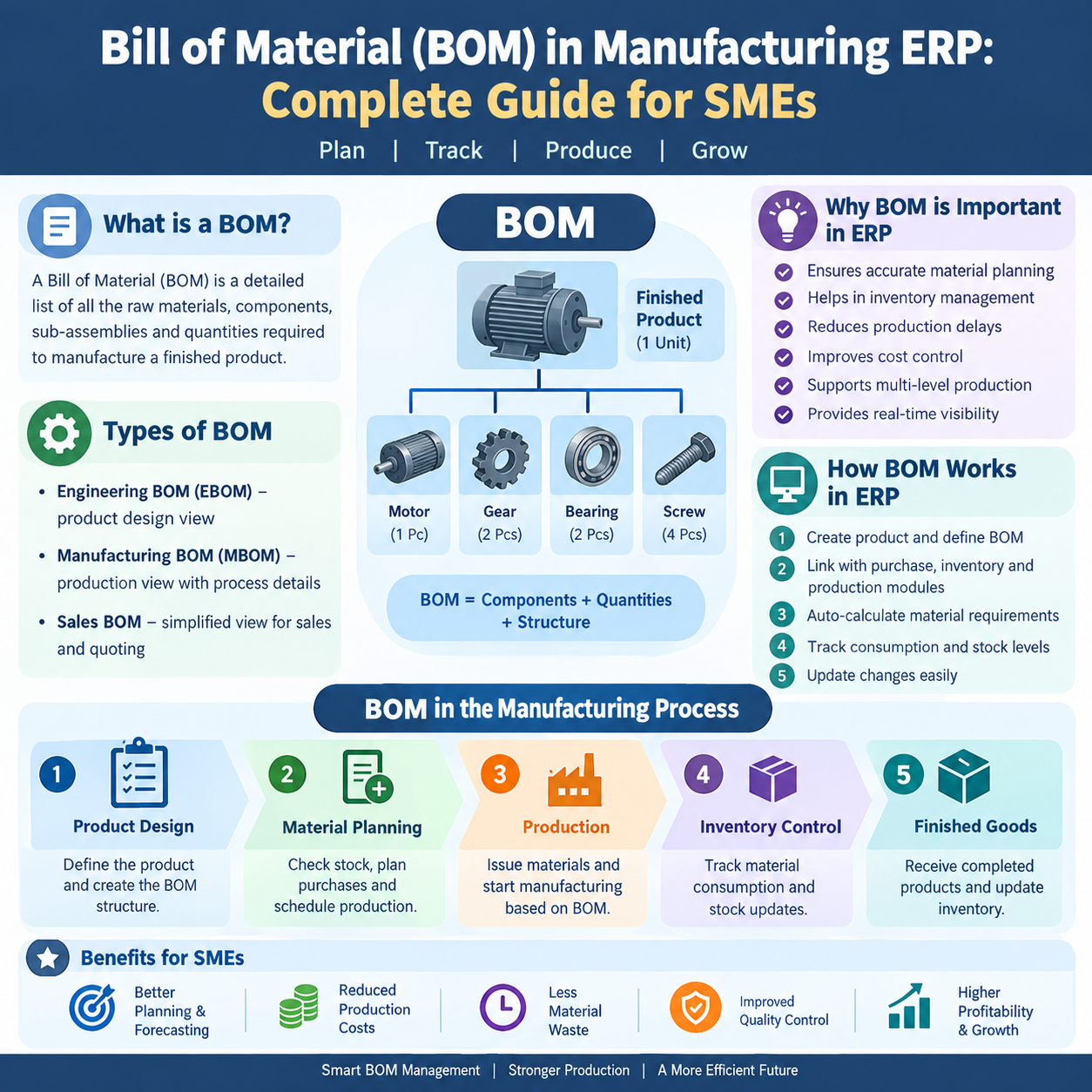
What Is a Bill of
Material (BOM)?
A Bill of Material is a structured list
of every raw material, component, sub-assembly, and quantity required to
manufacture a finished product. Think of it as a recipe: it tells you not just what
goes into a product, but how much of each item, in what unit of measure,
and often in what sequence.
A typical BOM line includes:
- Item code and description —
the raw material or component
- Quantity
per unit — how much is needed to
build one unit of the parent item
- Unit
of measure —
kg, meters, pieces, liters, etc.
- Scrap
or wastage percentage —
realistic material loss during processing
- Reference designator or operation — where in the process the item is consumed
Without this structure, purchasing
doesn't know what to buy, planning doesn't know what to schedule, and finance
can't tell you what a product actually costs to make.
Why BOM Accuracy Is
Critical for Manufacturing
The BOM sits upstream of almost every
operational decision:
- Material planning —
Purchase and production planning both start from the BOM. An incorrect
quantity here means either excess inventory sitting idle or a stockout
that halts the line.
- Costing
accuracy — Product cost is built
bottom-up from the BOM's material list plus labor and overhead. A stale
BOM gives you a wrong cost, which means wrong quotations and eroded
margins.
- Production
scheduling —
Work orders are generated against the BOM. If the BOM doesn't reflect the
current engineering revision, the shop floor builds the wrong version of
the product.
- Quality
and traceability —
When a defect is traced back to a batch, the BOM (tied to the right
revision) tells you exactly which components and lots were used.
- Vendor and procurement negotiation — Aggregated BOM demand across multiple work
orders gives purchasing real leverage on volume-based negotiations.
In short, a BOM error doesn't stay
contained — it multiplies across planning, inventory, shop floor, and finance.
Types of BOM
Structures
Not every manufacturer needs the same
BOM structure. The right structure depends on how complex your product is and
how it's built.
1. Single-Level BOM
Lists only the immediate components
needed to build the finished product, with no further breakdown. Suitable for
simple products assembled directly from purchased raw materials.
2. Multi-Level BOM
Reflects the real hierarchy of
manufacturing: a finished product is made of sub-assemblies, and each
sub-assembly is itself made of raw materials or further sub-components. This is
standard in most engineering, machinery, and fabrication businesses where
components are manufactured in-house before final assembly.
Example: A pump (finished good) → motor
sub-assembly + housing sub-assembly → each sub-assembly broken down into its
own raw materials and purchased parts.
Multi-level BOMs are essential once
your product has more than one manufacturing stage, because they let planning
and costing roll up correctly at each level rather than treating the entire
product as a flat list.
3. Configurable /
Variant BOM
Used when a base product has multiple
configurable options (size, color, capacity, add-ons). Instead of maintaining a
separate BOM for every variant, a configurable BOM lets you generate the exact
BOM based on selected options at order time.
4. Engineering BOM
(EBOM) vs. Manufacturing BOM (MBOM)
The EBOM reflects how a product is
designed (from drawings and specifications), while the MBOM reflects how it's
actually built on the shop floor, including process-specific items like
consumables, fixtures, and packaging. SMEs that don't distinguish between the
two often end up with production orders that don't match what engineering
intended.
Raw Materials,
Sub-Assemblies, and Multi-Level Planning
In a multi-level BOM, materials fall
into distinct categories, and each behaves differently in planning:
- Raw materials —
purchased directly, consumed at the lowest level of the BOM. Lead time and
reorder points matter most here.
- Sub-assemblies — manufactured in-house before being consumed
by a higher-level BOM. These need their own work orders, routing, and
costing, distinct from the parent item.
- Bought-out components — purchased ready-made (fasteners, bearings,
electronic parts) and consumed directly like raw materials but tracked
separately for vendor and quality purposes.
The planning complexity grows with each
level. A single finished good with three levels of sub-assemblies can translate
into dozens of purchase requirements once the BOM is exploded — which is
exactly the kind of calculation that becomes unreliable in a spreadsheet as
volumes grow.
BOM Revisions: Why
Version Control Matters
Products change — a supplier
substitution, a design improvement, a cost-reduction initiative. Every change
needs a new BOM revision, because:
- Open work orders may need to continue on the old revision while new
orders use the updated one.
- Costing
has to reflect the revision that was actually used for a given batch, not
just the latest version.
- Quality issues need to be traceable to the
exact revision and components used at the time of production.
Manufacturers who manage BOMs on paper
or in Excel almost always lose track of revisions. Someone updates
"the" BOM file, overwrites the previous version, and there's no
record of what changed, when, or why — until a customer complaint forces
someone to reconstruct history from memory and email threads.
How BOM Drives
Production Planning, Inventory, and Costing
Production Planning
When a sales order or production plan
is created, the BOM is "exploded" to calculate exactly what materials
and sub-assemblies are needed, at what quantities, and by when. This explosion
is what allows a planner to convert a demand forecast into an actual material
and capacity plan.
Inventory
Requirements
BOM-driven Material Requirement
Planning (MRP) compares what's needed (from exploded BOMs) against what's in
stock and what's already on order, generating accurate purchase and production
suggestions. Without this, inventory decisions are based on gut feel or reorder
habits — leading to either excess working capital tied up in stock or
last-minute expediting.
Product Costing
Standard costing rolls up material cost
(from the BOM), labor cost (from routing/operations), and overhead into a
per-unit cost. Since the BOM defines material consumption per unit, any
inaccuracy here directly distorts your quoted price, margin analysis, and
profitability reporting by product or customer.
The Problem with
Excel and Paper-Based BOMs
Most SMEs start with Excel, and it
works — until it doesn't. Common failure points:
- No single source of truth. Multiple
versions of the same BOM float around in emails and shared drives, and
nobody is sure which is current.
- Manual
explosion errors.
Calculating multi-level material requirements by hand or through nested
spreadsheet formulas is slow and error-prone, especially as product
complexity grows.
- No
link to actual consumption.
Excel BOMs don't automatically reduce stock or record what was actually
used on the shop floor, so inventory records drift further from reality
with every production run.
- No
revision history. As
covered above, overwritten files erase the audit trail needed for quality
and compliance.
- Disconnected
costing. Costing exercises become
periodic, manual re-calculations rather than a live number reflecting
current material prices and consumption.
- Dependency on individuals. When the one person who "knows the BOM
system" is on leave or leaves the company, planning stalls.
These aren't hypothetical risks —
they're the most common reason SME manufacturers underquote jobs, run into
surprise stockouts, or fail audits that ask for revision traceability.
How ERP Improves BOM
Accuracy
A manufacturing ERP with proper
BOM functionality solves these problems structurally, not just cosmetically:
- Single, controlled BOM master — one version is "active" at any time, with full
revision history and approval workflow for changes.
- Automatic
multi-level explosion —
MRP runs use the BOM directly to calculate purchase and production
requirements across every level, instantly and consistently.
- Live
linkage to inventory —
when a work order consumes material, stock is reduced automatically
against the exact BOM used, keeping inventory records accurate in real
time.
- Accurate,
current costing —
since material cost is pulled from live purchase rates against the BOM
structure, product costing reflects reality rather than a stale Excel
calculation.
- Full
traceability —
every batch produced is tied to the BOM revision, material lots, and work
order used, which is essential for both quality investigations and audits.
- Role-based access and history — changes to a BOM are logged with who made
them and when, removing the single-point-of-failure risk of one
spreadsheet owner.
This is where BOM software and ERP
software for manufacturing stop being a "nice to have" and start
directly protecting margins and delivery commitments.
BOM, Work Orders,
Material Consumption, and Finished Goods: How They Connect
It helps to see this as one continuous
chain rather than separate modules:
- BOM defines the recipe —
what and how much is needed to build one unit.
- A
work order is generated
against a specific BOM revision, for a specific quantity, with a specific
due date.
- Material
is issued to the work order,
consuming raw materials and sub-assemblies exactly as defined in the BOM —
with the ERP tracking actual usage against planned usage.
- Variance
is captured —
if actual consumption differs from the BOM (extra scrap, substitute
material), the ERP flags it, which feeds back into more accurate future
BOMs and costing.
- Finished goods are received into stock, with the system automatically relieving the
consumed components from inventory and increasing finished goods stock —
keeping both sides of the ledger accurate without manual reconciliation.
This chain is also where a Manufacturing
ERP earns its keep: BOM accuracy is only as useful as the work order and
inventory processes it feeds into. If you're evaluating systems, it's worth
reading how the full production cycle — from planning to shop floor execution —
comes together in our guide to Manufacturing ERP.
For shop-floor visibility once work
orders are running, our article on Production Tracking covers how real-time status updates
connect back to the BOM and work order. And if your operations involve
engineering changes or design iterations that feed into BOM revisions, the Engineering
Day Book article explains how day-to-day engineering activity gets logged and
linked to production data.
Many SMEs in India also outsource parts
of production — machining, plating, or sub-assembly — to external vendors. If a
portion of your BOM is fulfilled outside your own shop floor, see our guide on Job Work for how outsourced processing is
tracked against the BOM and reconciled on return.
Choosing BOM
Management Software in India
If you're comparing BOM management
software in India, look beyond just "does it store a BOM." The
questions that actually matter for SMEs:
- Does it support multi-level BOMs with automatic explosion for MRP?
- Can
you maintain and approve BOM revisions with a clear audit trail?
- Is
BOM consumption linked automatically to inventory and work orders, or does
someone need to update stock manually?
- Does
costing update automatically when the BOM or material rates change?
- Can
it handle configurable/variant BOMs if your products have options?
- Does it integrate with job
work/sub-contracting if part of your BOM is processed externally?
A system that checks these boxes turns
your BOM from a static document into a live operational and financial control —
which is the real value of Bill of Material software for a growing
manufacturer.
FAQs
1. What is the difference between a BOM
and a routing? A BOM defines what materials and quantities go into a product.
Routing defines how it's made — the sequence of operations, work
centers, and time required. Together, BOM and routing form the complete
manufacturing definition of a product.
2. Can a single product have more than
one BOM? Yes. This is common
when the same product can be built with alternate materials (based on
availability or cost), or when configurable/variant BOMs are used for products
with multiple options.
3. How does a multi-level BOM affect
lead time calculation? Each level in a multi-level BOM has its own procurement or
manufacturing lead time. The ERP calculates cumulative lead time across levels,
so planning accounts for the time needed to build sub-assemblies before final
assembly — not just the lead time of raw materials.
4. Why does BOM accuracy matter for
costing if raw material prices change frequently? Because the BOM defines the quantity
of each material used, live material rates can be applied against that fixed
quantity to get an updated cost in real time. Without an accurate BOM quantity,
even correct material prices produce the wrong total cost.
5. Is Excel enough for a small
manufacturer with only a few products? It can work temporarily for a handful of simple, single-level products
with low order volume. As soon as you introduce multi-level BOMs, frequent revisions,
or need inventory and costing to stay accurate automatically, Excel becomes a
liability rather than a convenience.
6. How does ERP handle scrap or wastage
in a BOM? Most ERP systems
allow a scrap or wastage percentage to be defined per BOM line, which is
factored into both material planning (so enough extra material is procured) and
costing (so the true cost per unit includes expected losses).
7. What triggers a BOM revision? Common triggers include engineering
design changes, supplier or material substitutions, cost-reduction initiatives,
quality corrective actions, and regulatory or compliance changes. Each should
result in a new controlled revision rather than an edit to the existing one.
A BOM is only as strong as the system
managing it. If your business is still tracking BOMs in spreadsheets, the risk
isn't just inconvenience — it's inaccurate costing, stockouts, and lost
traceability. Moving BOM management into a proper manufacturing ERP is one of
the highest-leverage changes an SME can make on the shop floor.
